Help with the “Chat with Sam” exercises
General help
- Don’t forget to activate your microphone.
- We recommend that you use a headset with a microphone or your smartphone.
- Be in a quiet place to do each exercise.
- We recommend that you use Chrome, Edge, Safari or Firefox.
Instructions
- To start the exercise, click on “Start conversation”:

- Sam will think about what to say:

- When Sam is ready, she will talk to you and ask you a question. You can click on “See transcript” to read the transcript at the same time if you want:

For example:
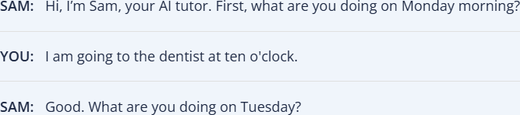
Once you have opened the transcript, you can hide it again with the option “Hide transcript”:

- When you are ready to talk to Sam or answer Sam’s question, click on “Start speaking” and talk to Sam:

- When you have finished your reply, click on “Stop speaking”:

- Sam will then continue the conversation. When you are ready to reply, repeat steps 4: “Start speaking” and 5: “Stop speaking”.
- Sam will continue to talk to you. Repeat steps 4 and 5 until Sam finishes the conversation.
- At the end of the conversation, you can view and download your feedback “View feedback”:

- If you would like to repeat the exercise, click on “Start again”. Note: you can do each exercise twice.